A product designer with 5+ years working at the intersection of B2B software and AI. I’ve led design for AI-native workplace agents, enterprise data platforms, and internal tools used by thousands of professionals.
Notes from the PMs, engineers, and designers I've built products with.
LinkedIn recommendation#01
Curiosity & growth mindset
Carrie is a designer with bounds of curiosity and cares deeply about those she is designing for. She is someone who strives to constantly and proactively learn and understand more about her design decisions. I look forward to seeing Carrie’s journey as a designer as she continues to work hard and continues to embrace her growth mindset.
Chris Lo
UX Manager
LinkedIn recommendation#02
Proactive & collaborative
Carrie’s open and positive approach to feedback and suggestions makes working with her an absolute pleasure. Her proactive nature allows her to anticipate the needs of her team members, providing solutions and insights that add significant value to the project. Her design skills are truly outstanding, and her ability to collaborate effectively is what sets her apart from others. She brings a unique and fresh perspective to the table.
Jimsson Lim
Senior UX Designer
Trajektory#03
Quickly grasps complex concepts
One of Carrie’s standout qualities is her commitment to learning about our users and the industry we are working in. Her dedication to understanding our users and their unique needs helped us develop high quality UI/UX solutions. Carrie’s ability to quickly grasp complex concepts and adapt her design approach accordingly is a testament to her talent as a product designer.
Matt Powers
Chief Technology Officer (CTO)
Trajektory#04
Great communicator, self starter
Carrie is an incredible product designer who exercises user empathy and an ability to take complex concepts and translate them into simple and intuitive designs. When it came to crunch time Carrie was able to match the rapid pace of the engineering team and product when it counted the most. She is a self-starter, and a great communicator and overall person that will elevate the success and culture of any team she’s in.
Tim Chung
Senior Product Manager
The people make the work.Hover to wiggle
0→1B2BAI WorkflowWeb
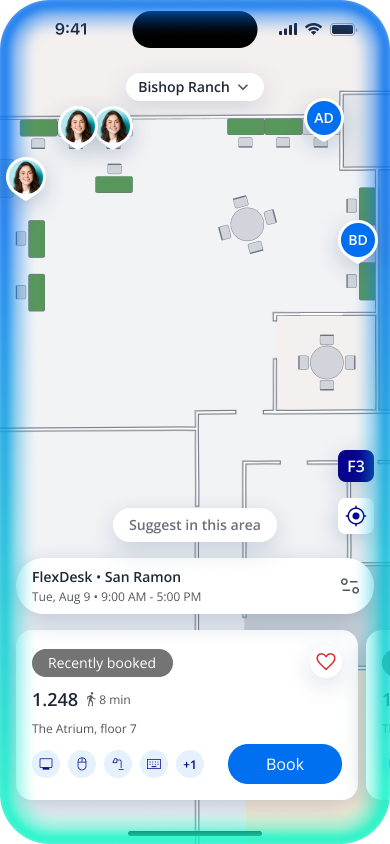
AI agent for code review
Wraps up your to-dos upon review and approval — an agent that reviews pull requests and turns findings into a clear, actionable checklist.
Problem
Are you overwhelmed by Slack messages, Jira tickets, and GitHub PRs? If so, you already know the feeling: work was getting stuck without anyone noticing until it was already late.
760
review requests across our repositories went unanswered
38%
of merged work never moved to QA or Done
The second half of the problem is that nobody sees the doing, either. Accomplishments scatter across GitHub, Jira, and Slack, and the systems that would show the delay go out of date at the same time the delay accrues. Individuals feel this as anxiety and overwhelm; teams feel it as slipped releases.
Overview
Beat is an execution system built around a single person's workflow. It connects to GitHub, Jira, Slack, and Granola, where that person's work already lives, prepares the next step the moment work becomes actionable, and surfaces action items for approval.
AI sits on top of the execution plan, generating action plans and asking clarifying questions before acting on a person's behalf.
As Lead Product Designer, I led the vision for reimagining how employees handle tickets — Jira tickets and GitHub PRs. The projected productivity gains give engineers and PMs more room to focus on strategic, high-impact work.
A note on this case study
This work is ongoing and covered under an NDA. If you'd like to hear more about the problem space, the design decisions, or what I shipped, I'd love to walk you through it.
0→1B2BAI WorkflowMobile
Workplace agent for room booking
An agent that handles room booking and meeting scheduling, so teams spend less time coordinating and more time meeting.
Overview
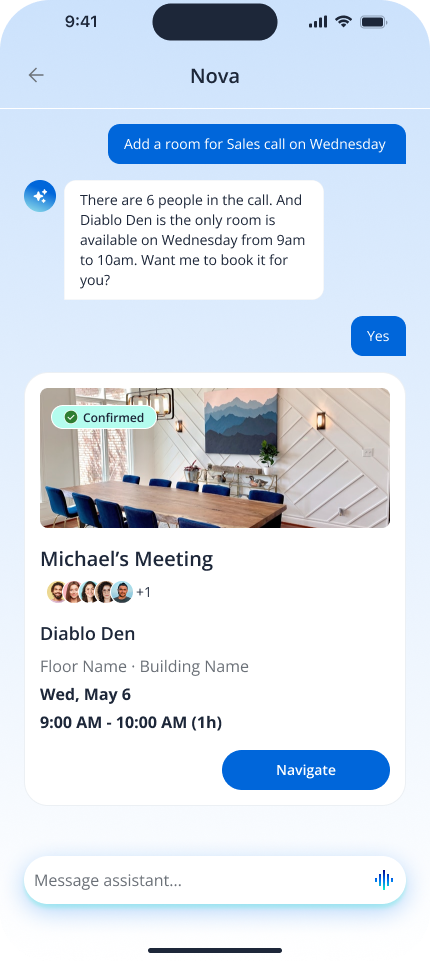
Nova is a workplace agent for space booking and meeting scheduling, built on top of our legacy workplace app. As product design lead, I owned the agent experience from 0 to 1: identifying the queries, inputs, and intents users would bring to it, designing the UI outputs, defining when the agent needs a person's approval, and working with engineering and product to set its guardrails and operating principles.
The business goal
The request came from stakeholders with a clear mandate: build an AI agent for workplace booking, because customers were saying they wouldn't buy without one. AI had become table stakes in sales conversations — the immediate goal was to not lose deals over it, not yet a specific, validated user need.
The problem
Rather than design straight from that brief, I started by looking at what our legacy app's booking data could tell us.
-5%
drop in monthly active users, month over month
Flat
booking volume over the same period
Bookings, not app opens, were what drove engagement on the legacy app — so a shrinking user base with a steady booking rate meant something was happening outside our product. Digging into the booking logs with engineering, we found it: a portion of bookings were being made by an unauthorized third-party AI agent, connecting to our system on users' behalf. It was a security risk with access to space and calendar data, and — functionally — a competitor sitting on top of our own product. We shut off that access immediately.
That confirmed the real problem underneath the original brief: employees already wanted an AI agent for booking, and if we didn't build one, someone else would build it into our product for them.
What we learned from users
I interviewed employees who were already using outside agents to book, to understand what they liked, what they didn't, and where the legacy app still won.
They liked the agent for speed: for a simple booking — a desk or a room, just for themselves — they'd rather send a prompt than click through date, time, and location filters. But for anything more complex — a meeting room with several attendees, a scheduled meeting with catering or AV — they still preferred the legacy app's structured flow, where nothing gets missed.
The bigger insight was about data: the third-party agent didn't know anything about the user, but we did — recent and past bookings, who they usually meet with, colleague and room availability, on-site schedules, calendars, and company holidays that affect bookings. That became our opportunity:
How might we use what we already know about employees to book spaces right the first time, and keep them in control of group bookings?
Exploring the solution space
I scoped three directions:
Option 1 — Hybrid, Siri-like voice assistant
A voice-focused layer on top of the existing app — users speak a request and the app responds in place, without a dedicated agent surface.
Option 2 — AI agent, chat + voice, on its own dedicated page
A conversational agent — chat and voice — living on its own page, separate from the existing booking flows.
Option 3 — Agentic app, entire app agent-driven
The whole app redesigned around the agent — surfacing agent suggestions contextually throughout the home screen, not just in a dedicated chat.
Voice-first raised real engineering costs: it would have to constantly parse the UI to know what page a person was on and what they'd already selected. The agentic app was the most differentiated option, but meant redesigning the entire product around the agent, which our timeline couldn't absorb while competitors were already shipping. The team chose the dedicated agent page — fastest to build, and it could ship inside the existing app. The tradeoff we knowingly took on: on its own, that's the same shape as every other prompt-a-booking agent on the market, not a differentiator.
The design decision that shaped the product
Given the engineering timeline and the differentiation concern, I proposed visualizing the agent's outputs using UI components employees already recognized from the legacy app — space cards, availability views, confirmation patterns — instead of plain conversational text. Familiar components let people verify what the agent found at a glance and trust it faster, without us having to rebuild the whole app around the agent. Both engineering and product signed off, and I built it out as a reusable AI agent component library that now standardizes how the agent shows its work across the product.
Design challenge: autonomy vs. control
"The biggest design challenge with an AI agent isn't the chat interface — it's designing the right balance between autonomy and user control. I had to determine what the agent could confidently handle on its own, when it should ask for clarification, and when the user needed to review or approve an action, then make that behavior legible in the UI, especially when something went wrong."
For example: when Nova books a workspace, we didn't want someone to manually click through every step, but we also didn't want the agent quietly booking the wrong space because it assumed something important. We designed around three principles — confidence, transparency, and human-in-the-loop moments — so the agent handles the repetitive work while the user keeps control of the decisions that matter.
Solving for the edge cases
Several open questions shaped the interaction model: How does the user know the agent understood them correctly? How do we show what the agent is doing without overwhelming them? How should the agent communicate "I'm not sure"? What happens when a request isn't specific enough to act on?
I designed fallback states with simple agent outputs and a clear call-to-action toward the next step, and set a rule with engineering that the agent must have a date and time before it proposes spaces — asking first rather than guessing at missing details.
Outcome
+35%
booking rate, beta vs. legacy baseline
+17%
daily active users, beta vs. legacy baseline
We validated the design with a closed beta for one client, tracking booking rate and daily active users against the legacy baseline before a wider rollout. Both moved in the direction that mattered — confirmation that the agent was solving the real problem, not just adding an AI feature for its own sake.
0→1B2BWeb
API integration platform for revenue teams
A platform that lets revenue teams connect their tools and automate workflows without writing code.
Overview
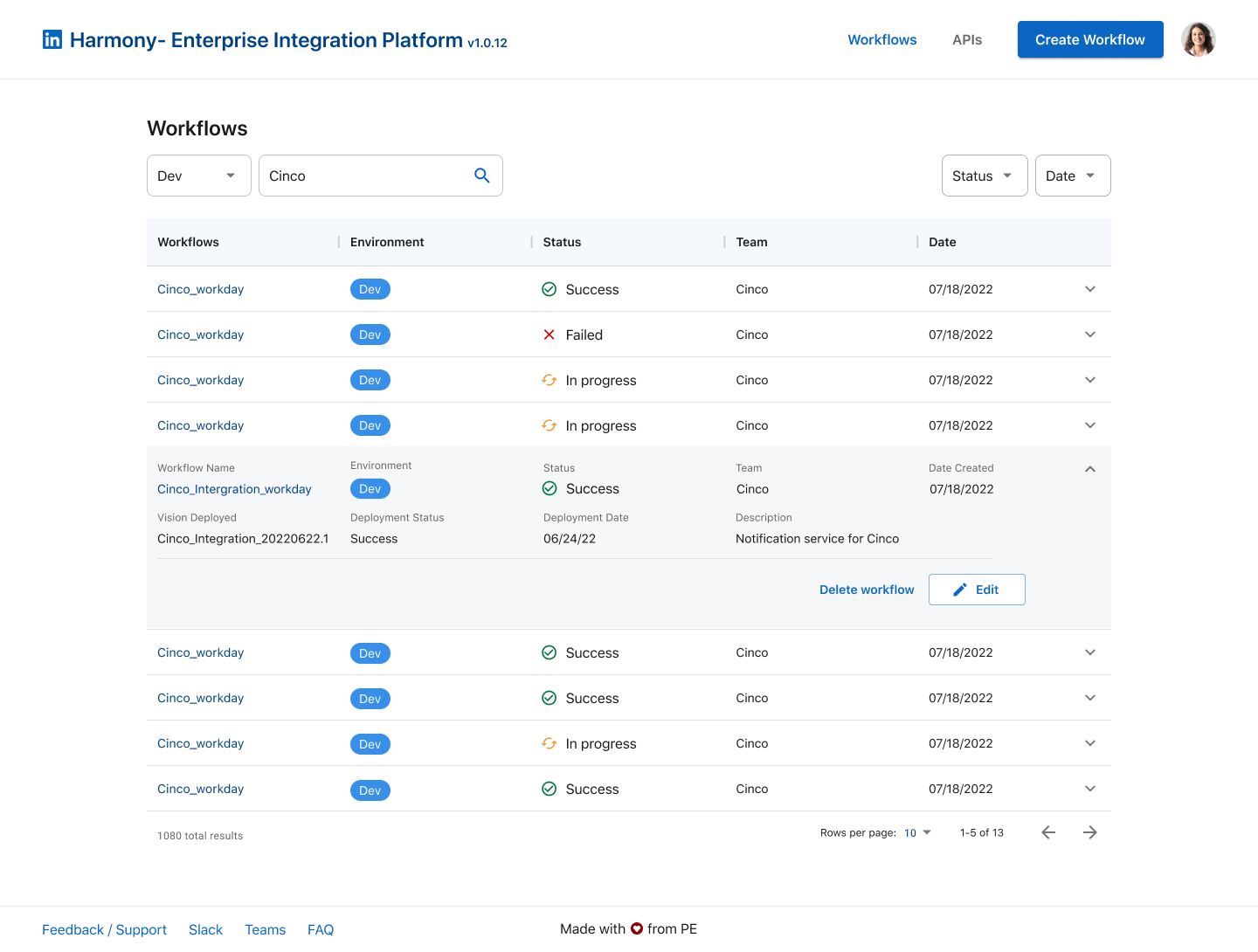
Harmony is an API-driven integration platform for LinkedIn's revenue-adjacent teams — Sales, Finance, and Marketing — that lets them connect their existing tools and automate workflows between them without writing code. As UX Designer on the Productivity Engineering team, I designed the platform's workflow creation, monitoring, and management experience.
The problem
Sales, Finance, and Marketing were each relying on disconnected systems in their day-to-day work, so data had to be manually reconciled between tools. That reconciliation was slow and error-prone, and it showed up as inconsistent data across systems. Altogether, these inefficiencies were costing over $3.2M a year in lost productivity and delayed revenue recognition.
Process
I focused the design on giving teams visibility into automation that had previously been invisible: a Workflows dashboard where a team can see every workflow they own, filtered by environment and status — success, in progress, or failed — and a workflow detail view underneath it, so anyone can drill into a single workflow to see its resources, the APIs it depends on, its environment settings, and its deployment history.
The solution
Together, this gave Sales, Finance, and Marketing teams a self-serve way to build automated workflows across the tools where their work already lived, retrieving and syncing data automatically instead of by hand.
Outcome
The platform's north star was to raise data accuracy and cut down the manual errors that came from stitching systems together by hand — turning that $3.2M in lost productivity and delayed revenue recognition into time and accuracy the teams got back.
RedesignWebDashboard
NHL DED sponsorship performance dashboard
A data visualization platform that helps NHL teams and sponsors prove the value of a brand-new digital ad format — built to a hard launch date, ahead of the 2023 season.
Context and stakes
In 2022, the NHL introduced Digitally Enhanced Dashboards (DEDs) — AR-overlaid digital ads on the dasherboards that replaced static in-arena signage during live broadcasts. For teams and sponsors, DEDs meant a new, more flexible way to sell and monetize sponsorship inventory. For Trajektory, it meant a brand-new sponsorship valuation problem: DEDs could change creative and placement mid-broadcast, which made them harder to track and value than a sign bolted to a wall for a season.
The users were two groups with different questions: NHL team sponsorship staff, who needed to show a partner what their package delivered, and the sponsors themselves, who needed to defend that spend to their own finance teams. Both were flying blind — the tracking data existed, but nothing translated it into a number either side could act on.
Timing raised the stakes. DED was a brand-new product line for the company, I had just joined, and we were building toward the start of the 2023–24 NHL season — a fixed, external deadline set by the league calendar. Success wasn't "a clean-looking dashboard." It was whether teams and sponsors trusted the numbers enough to renew and expand DED packages once the season started.
I was the sole product designer on this project. I partnered with one PM and the engineering and data team building the DED tracking pipeline, and — since we had no dedicated research function for this line of business yet — I ran the discovery interviews with NHL teams and sponsors myself.
Reframing the problem
The brief, as handed to me, was to visualize the data the DED tracking pipeline was already capturing: exposure events, timestamps, and zone IDs, laid out in charts instead of raw tables.
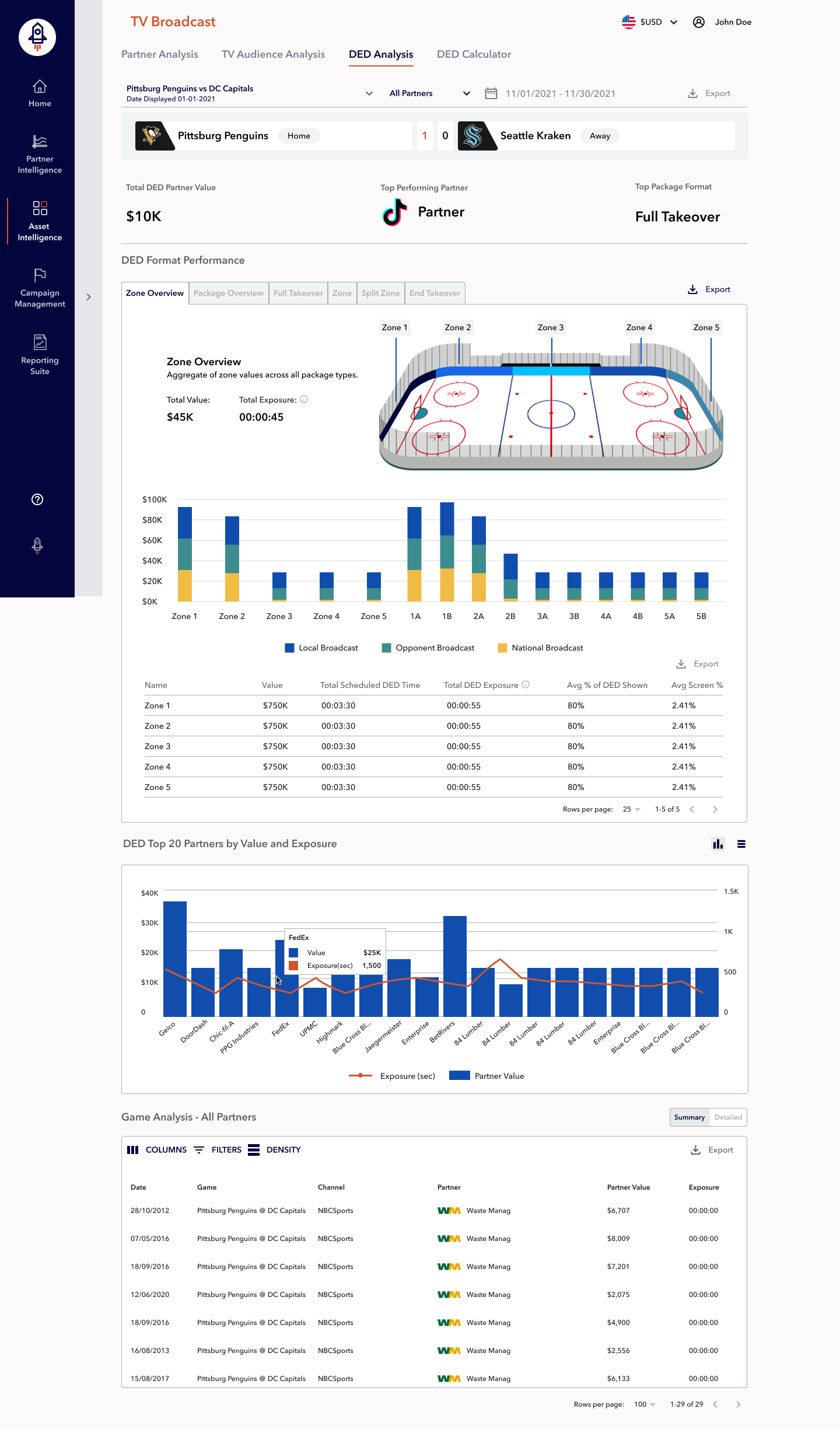
The dashboard as originally briefed: correct data, but organized around dates and zone numbers instead of the questions sponsors were actually asking.
Research showed that visualizing the existing data wasn't the real problem. In interviews, teams and sponsors weren't struggling to see data — they were struggling to turn it into a business case. They told us the raw event log "fell short of capturing the nuances of digital sponsorship," and that what they actually needed was the kind of metric they already used to justify budget internally: exposure count, on-screen duration, audience reach, estimated dollar value — the vocabulary of Sponsorship Media Valuation (SMV), not the vocabulary of our tracking pipeline.
So the problem shifted from "chart the DED events" to "translate raw exposure telemetry into a defensible valuation a sponsor could put in front of their own boss." That reframe changed almost everything downstream — which five metrics we prioritized, how we labeled zones and games, and why a plain table wasn't going to be enough on its own.
Key decision 1 — Lead with valuation metrics, not the raw event log
Options considered: Engineering already had a complete, ready-to-ship event log — every DED trigger, its timestamp, and its zone ID. Shipping that first, and layering valuation on later, was the fastest path to the launch date. A second option was building a fully custom scoring model unique to Trajektory. The third was adopting the industry-standard SMV framing sponsors already used elsewhere: number of unique DED appearances, on-screen duration, mean exposure length, number of feeds, and estimated dollar value.
The evidence that decided it: Interview after interview, sponsors described translating raw numbers into a value story as the actual bottleneck — not access to data. A custom valuation model would have taken longer to design and validate than our launch window allowed. The SMV framing was already how they talked about spend internally, which meant less education, more trust.
What I gave up: The fast option — shipping the log Trajektory already had — was off the table. This meant more upfront design work to prioritize which five metrics actually mattered, and it pushed real work onto engineering and data to compute derived numbers (mean exposure length, estimated dollar value) that didn't exist in the pipeline yet.
Who disagreed, and how it resolved: Engineering's initial instinct was to ship the existing event data for launch and add valuation metrics in a follow-up release, since the derived calculations required new logic they hadn't built. I made the case — backed by the interview transcripts — that a dashboard sponsors couldn't use to justify a renewal wasn't worth shipping at all, even on time. We agreed to prioritize the five SMV metrics for launch and moved the granular event log to a secondary, lower-priority table.
Key decision 2 — Give people both a chart and a table, not one or the other
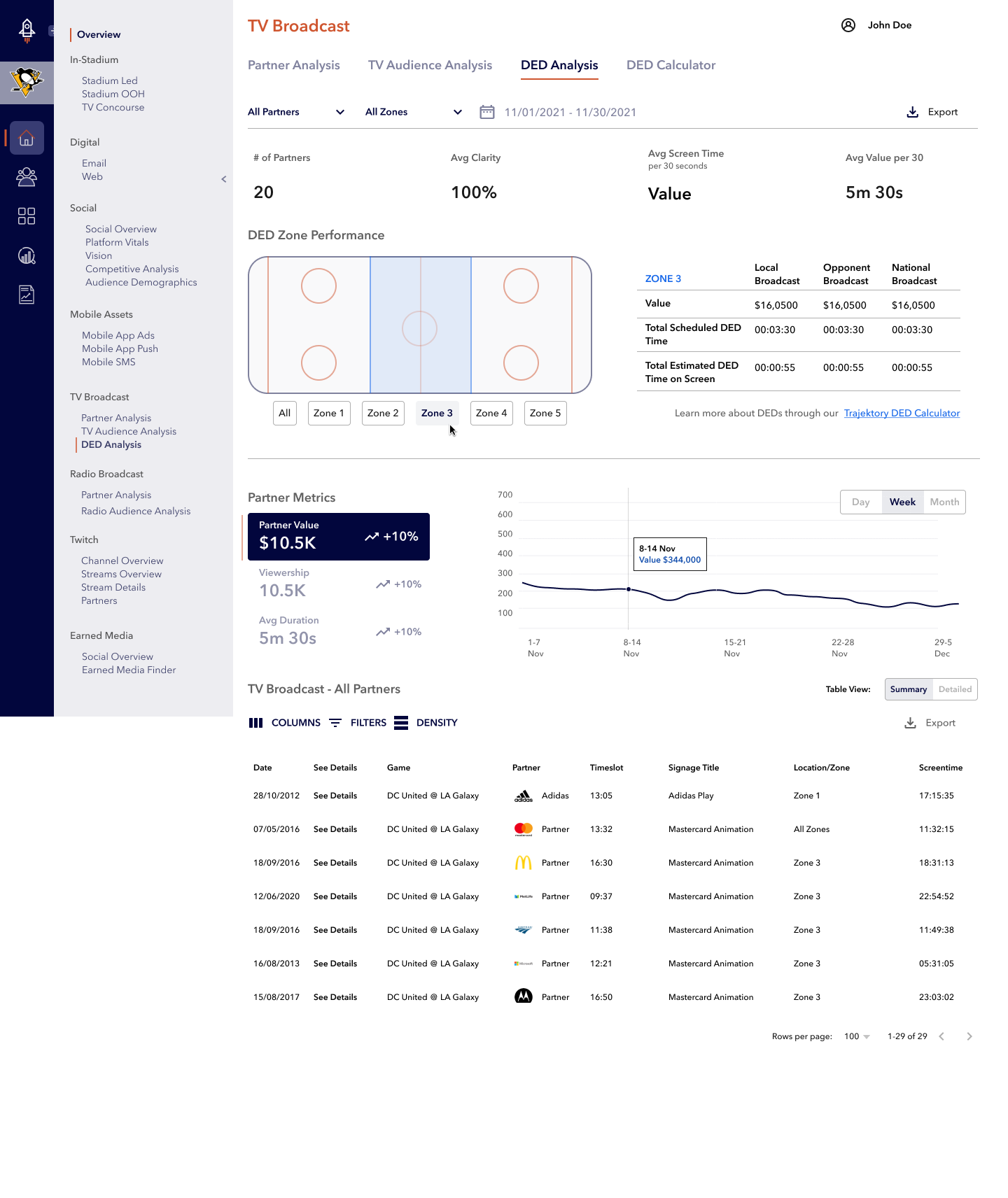
Options considered: Prototype testing surfaced a clean split in how people wanted to read partner value and exposure — some wanted a bar chart they could scan in seconds for a stakeholder conversation, others wanted a table with exact numbers for finance. The options were: ship a bar chart only, ship a table only, or build both and let people switch.
The evidence that decided it: Both groups were right for their own job. The bar-chart users were mostly sponsorship and marketing staff who needed a fast visual for a deck. The table users were analysts who needed defensible, exact figures. Neither reading was "wrong," and picking one would have made the dashboard unusable for the other half of our audience.
What I gave up: Building a chart/table toggle on the same dataset took more design and engineering time than shipping a single view — two representations to design and test, plus the switch itself, against a fixed date.
Who disagreed, and how it resolved: The PM initially wanted to ship the bar chart alone and treat the table as a "detailed view" nice-to-have for a later release, to protect the launch timeline. I pushed back using testing notes showing analysts explicitly asking for exportable numbers; we agreed to scope the toggle into launch and cut a lower-priority feature (a more elaborate "Split Zone" visualization) to a later release instead.
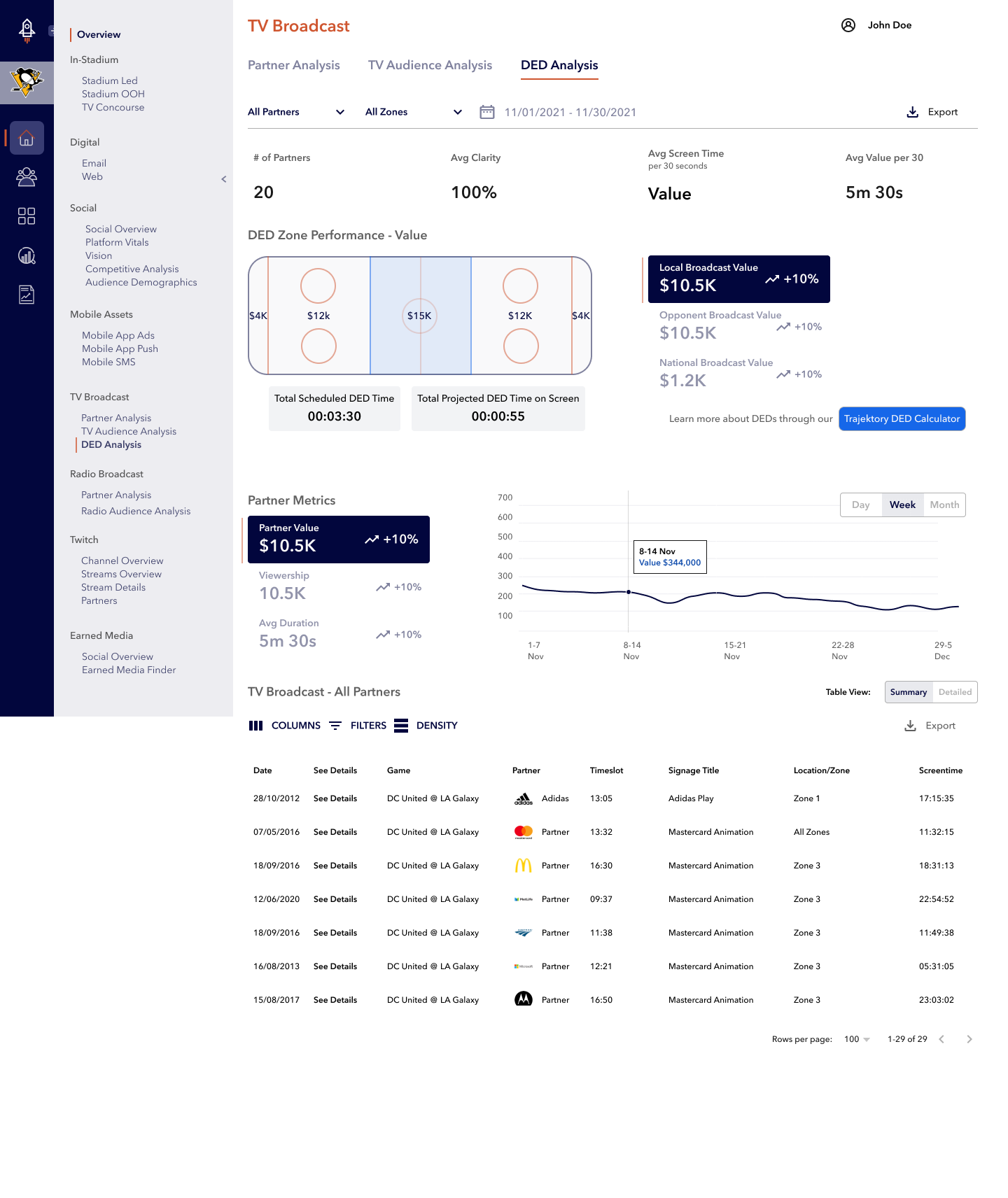
The final game-level view: chart/table toggle, named games instead of dates, and the top 20 partners called out by value and exposure.
Key decision 3 — Redesign zone and game identity, not just the display layer
Options considered: Usability sessions found people couldn't tell which zone or broadcast type a value belonged to, and they wanted to review past games by name rather than by date. One option was to leave the zone-ID and date-based data model alone and add a legend. A second was to add a partner filter without touching labeling. The third was to rework the labeling itself — human-readable zone tabs, a plain-language package glossary, and named games in place of dates.
The evidence that decided it: This wasn't a cosmetic complaint. People were abandoning the view entirely because they couldn't confirm what a number referred to — if they couldn't tell what a number meant, they didn't trust the total either. That distrust bled into the whole dashboard, so a legend bolted onto the existing model wasn't going to fix it.
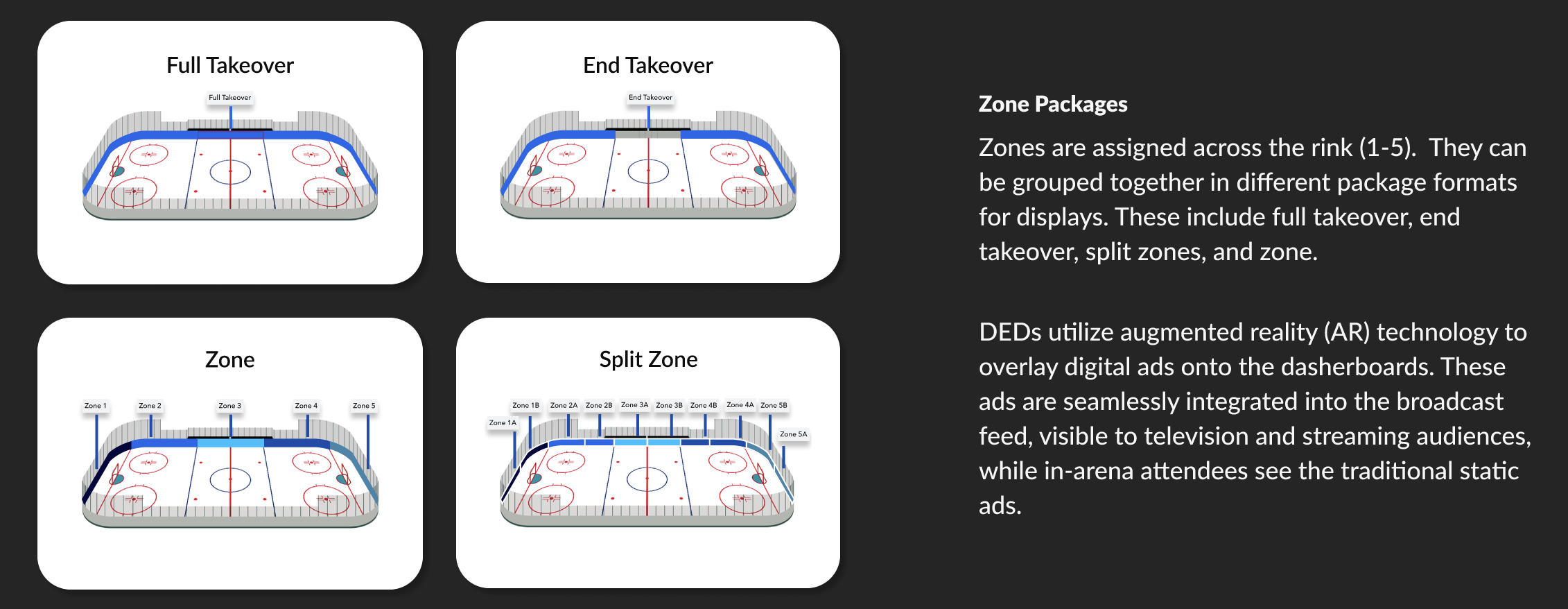
What I gave up: The full relabeling meant asking engineering to expose human-readable game names and zone metadata through the API — work out of scope for what had been framed as a "display-layer" project. It also meant designing and shipping a zone-package glossary (Full Takeover, End Takeover, Zone, Split Zone) so the new labels made sense on their own.
Who disagreed, and how it resolved: The original scope treated the dashboard as read-only on top of existing identifiers, and widening it into an API change wasn't a small ask this close to launch. I raised it as a trust problem rather than a polish request, which reframed it as launch-blocking; the PM agreed to a small backend task to expose game names and zone labels, and in exchange we deferred the Split Zone visualization to the next release.
Zone tabs replaced numeric-only IDs, and a short glossary explained what each package format meant — the two pieces that rebuilt trust in the numbers.
Outcome
We launched the DED dashboard in October 2023, on schedule for the start of the season. Being one of the only sponsorship platforms with a working DED dashboard at that point helped the company close five new clients in the same month it launched — the metric that mattered more than any interface detail. It was also my first project in sports sponsorship: getting it right meant building trust with NHL teams and sponsors directly, not just designing a good-looking chart.